
Your team doesn't know what "agentic" means (be honest)
Your team doesn't know what "agentic" means (be honest)
Everyone's saying "agentic." Almost nobody's explaining it. Here's what an AI agent actually is under the hood, in plain PM terms, and the one equation that makes the whole category click.

" height="20px" id="D2av7Oa6w" width="20px"/></svg>)
" height="20.035778175313055px" id="eWFuVHpu9" width="22.150617531305898px"/></svg>)
" height="20.19299259259259px" id="jW1ICukqX" transform="translate(0 0)" width="20.05540740740753px"/><path d="M 5.014 19.008 C 7.783 19.008 10.028 14.753 10.028 9.504 C 10.028 4.256 7.783 0 5.014 0 C 2.245 0 0 4.256 0 9.504 C 0 14.752 2.245 19.008 5.014 19.008 Z" fill="rgb(0, 0, 0)" height="19.00823703703702px" id="o80dVBhnW" transform="translate(21.028 0.592)" width="10.02800000000002px"/><path d="M 1.764 17.031 C 2.738 17.031 3.527 13.218 3.527 8.515 C 3.527 3.813 2.739 0 1.764 0 C 0.79 0 0 3.814 0 8.515 C 0 13.217 0.79 17.031 1.764 17.031 Z" fill="rgb(0, 0, 0)" height="17.030755555555572px" id="dzJnzwG1A" transform="translate(32.028 1.58)" width="3.527407407407395px"/></g></svg>)
A few months ago, during our annual planning, our engineering manager laid out the roadmap for the year and put adopting agentic AI right at the top of it. Everyone in the meeting nodded along, but two weeks later, in our quarterly planning meeting, the non-technical PMs didn't quite understand what agentic AI meant.
One PM was wary: 'Did you see that article about the AI agent that wiped a company's production database? Maybe we limit agentic AI to documentation for now, nothing that touches our real systems.'
Another PM was optimistic: 'This could be a real productivity boost; we might finally clear a whole year's worth of tech debt in one quarter.'
Both reactions came from the same place. 'Agentic' has become one of those words that's suddenly everywhere (agentic workflows, agentic coding, agent swarms). So when people can't picture what's actually under the word, they fill the gap with either fear or fantasy. The reality is far more grounded.
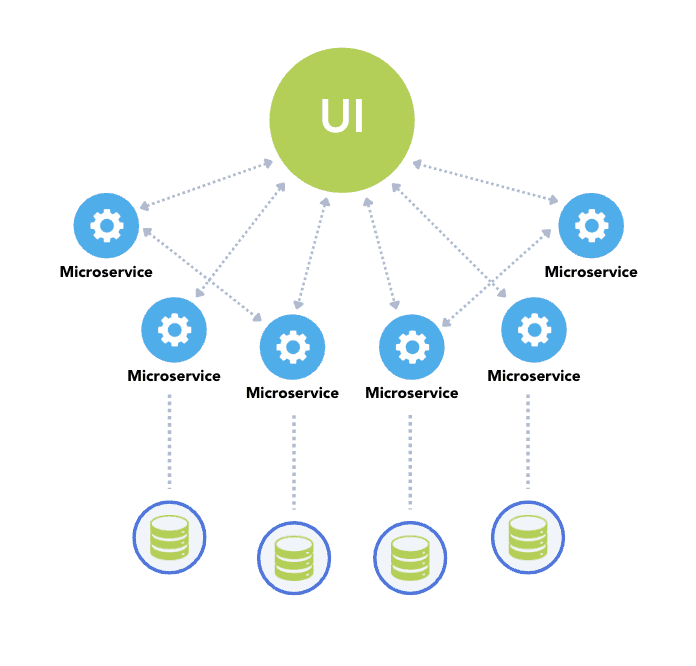
The new hire analogy (steal this for your next meeting)
Imagine you just hired a new capable teammate. The first thing you do is onboard them. You show them which systems they're allowed to touch, what they’re expected to do, and review their work until it earns your trust.
Think of AI Agents in the same way. Many people see AI agents as “set-it-and-forget-it”, when in reality they’re a useful tool that you need to learn how to use and to refine over time. In other words, AI agents are something you scope, supervise, and let grow into their role.
Every good team member brings these three things to the job:
Good judgment
Valuable skillsets
Ability to handle repetitive work
AI agents bring the same three things, which brings us to what makes an AI agent an agent versus a chatbot.
What makes an AI agent an Agent
AI agents are made up of the following components:
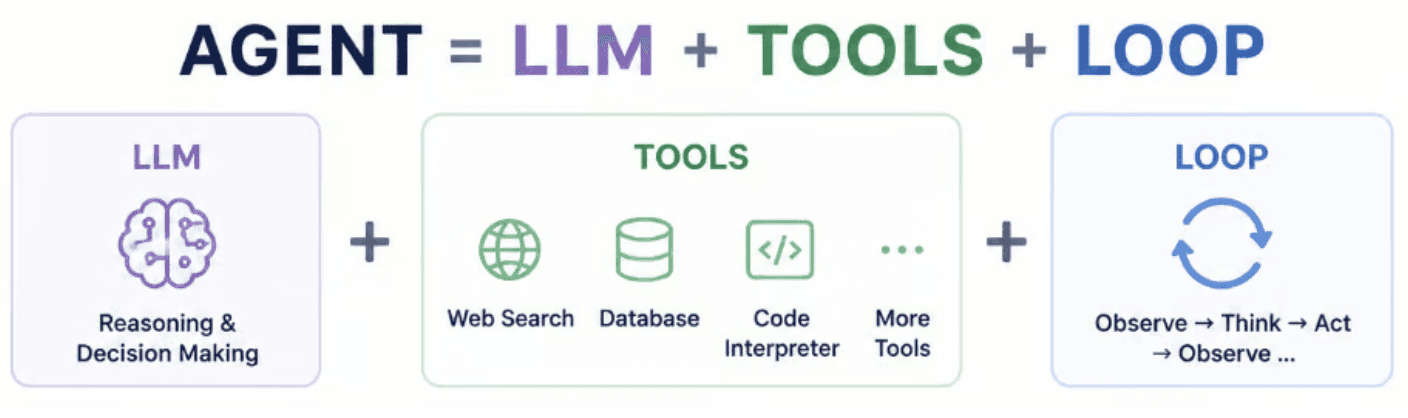
LLM: the brain doing the thinking
The LLM (large language model) is the “brain” that does the thinking and exercises judgment, but that’s the only thing it’s able to do. It can't send an email, read a file, or search the web. It has no memory of past conversations or even prompts from within the same chat. It just reasons. Think of it as a brain in a jar, incredibly capable but completely disconnected from the world.
Tools: the “skills”
In AI agents, a “tool” is a piece of business logic (a code function, if you will) that the model is allowed to call. An engineer writes the code behind each tool and tells the LLM which tools are available.
Think of these tools as skills that a human team member might have. For example, you could ask your AI agent to do something you might ask of an executive assistant, like "What's on my calendar tomorrow, and can you move my 9 am to Thursday?".
If you enter this prompt into your AI agent, the LLM will decide the tools it needs to use are ‘get_calendar’ to look at the calendar, then ‘update_event’ to update a specific meeting to Thursday.
Each agentic provider has their own built-in tools that they ship and run. Separately, you can provide custom tools that run on your team’s own infrastructure, with the execution and data staying on your side. The custom tools are exposed to the agent through the agentic provider’s APIs.
Loop: the part that makes AI “agentic”
The difference between an AI chatbot and an AI agent is the agent’s ability to keep executing on tasks without you telling it to keep going.
An AI chatbot is like a team member who answers exactly the one question you ask, then waits. Smart, but you're doing all the thinking about what to ask next.
An AI agent is that same team member, except you've handed them a goal ("get our Q3 competitive analysis done"), given them logins to the tools they need, and said, "keep going until it's finished; check your own work as you go."
A chatbot is one-shot: you ask, it answers, done. An agent runs in a loop, cycling through the same four steps on its own:
Act: take one step toward the goal (call a tool, search, write something).
Observe: look at what came back. Did it work?
Decide: based on that result, choose the next step.
Repeat: go again, and again, until the goal is met. No human presses "go" between steps.
The agent keeps going until one of three things happens:
It judges the goal complete
It hits a limit you've set (a number of steps, or a time or cost budget)
It gets stuck and asks for help
Deciding what "done" looks like and setting those guardrails is exactly the kind of call you'll own as a PM.
With an AI agent, you're no longer dictating steps.. you're delegating an outcome. This is what’s made possible by the “loop”.
3 Questions to ask when setting up an AI Agent
As a PM, you’ve likely already set up your own agent or am looking to do it. Here are 3 questions to ask and answer in order to set up an AI agent for maximum effectiveness:
What's its goal? What are we telling it to accomplish, and what does “done well” look like? If the goal is fuzzy, the loop will wander. If you can’t describe the success criteria crisply, the agent won’t be able to hit it and you can’t measure what it did
What does the Agent need to do the job - tools and context? An agent acts through tools and reasons over context (the data and knowledge you hand it). Two failure modes live here: either it’s missing a tool it needs so it can’t complete its task, or it’s missing context so the LLM is unable to have good judgment.
What happens when it’s wrong? AI agents will hallucinate, take a bad action, or get stuck looping sometimes. Setting it up for success means deciding the blast radius of a mistake up front. High-cost actions like moving money or offering refunds should require human approval.
Let’s make this concrete. Say your support team is drowning in customer support tickets, and you want to build an agent to handle first-pass triage.
What's its goal?
“Read each incoming ticket, categorize it into the following categories, resolve the two most common types of tickets (e.g. order status, refund eligibility), and route everything else to the right team with a drafted reply attached”
What tools and context does the Agent need to do its job?
The agent must be able to read each ticket, be able to search for the customer’s order status, be able to tag a ticket with its category, be able to draft and send replies, and be able to escalate to the right team. For context, it needs to have access to internal company policies for refunds and examples of past resolved tickets to match your team’s tone and precedent.
What happens when it’s wrong?
Not every action carries the same risk, so don’t guard it the same way. Tagging a ticket and drafting a reply is cheap and reversible, so let it run. Sending that reply to a real customer is a bigger deal, so at launch you might auto-send only for the three ticket types you trust, and gate the rest behind a human glance. Issuing a refund touches money, and it's hard to undo, so that should always require human approval. You're drawing a line between what it can do unsupervised and what needs a checkpoint, based on cost and reversibility.
In this example, the agent loop runs per ticket. The loop ends when it judges that the goal for that ticket is complete, or if it gets stuck and asks for help.
Final thoughts for setting up AI agents
Think of onboarding an AI agent the same way you’d onboard a new hire: by spelling out clear goals, good guardrails, and a definition of done in plain language. This goes for both building AI agents for your personal productivity and working with engineers to set up AI agents as part of a product feature or customer deliverable.
And remember, just like a new hire, an agent isn’t perfect on day one. They need to be trained and iterated on until their judgment earns your trust. The more complex the task, the longer this “onboarding” time takes. Through iteration and review, the AI agent will progressively get better over time.
Your team doesn't know what "agentic" means (be honest)